Recommended Hotel Pricing Settings to Maximize Revenue Performance
Hotels have unique pricing requirements shaped by multi-room inventory, occupancy levels, seasonality, and market demand. PriceLabs provides custom-built pricing settings designed specifically for hotels, helping you capture every revenue opportunity amid changing demand patterns.
This article outlines:
- PriceLabs’ recommended settings for hotels
- Why each setting matters
- Configuration guidance
Before You Start
- All settings are fully reversible. You can apply changes, preview prices using the Preview Price option, and save only if the results look right.
- Make these adjustments at the room, group, or account level based on your pricing strategy.
Quick Reference: Hotel Settings Overview
These recommendations are based on pricing behavior observed across multi-room hotel portfolios.
The recommended settings to enable for hotels
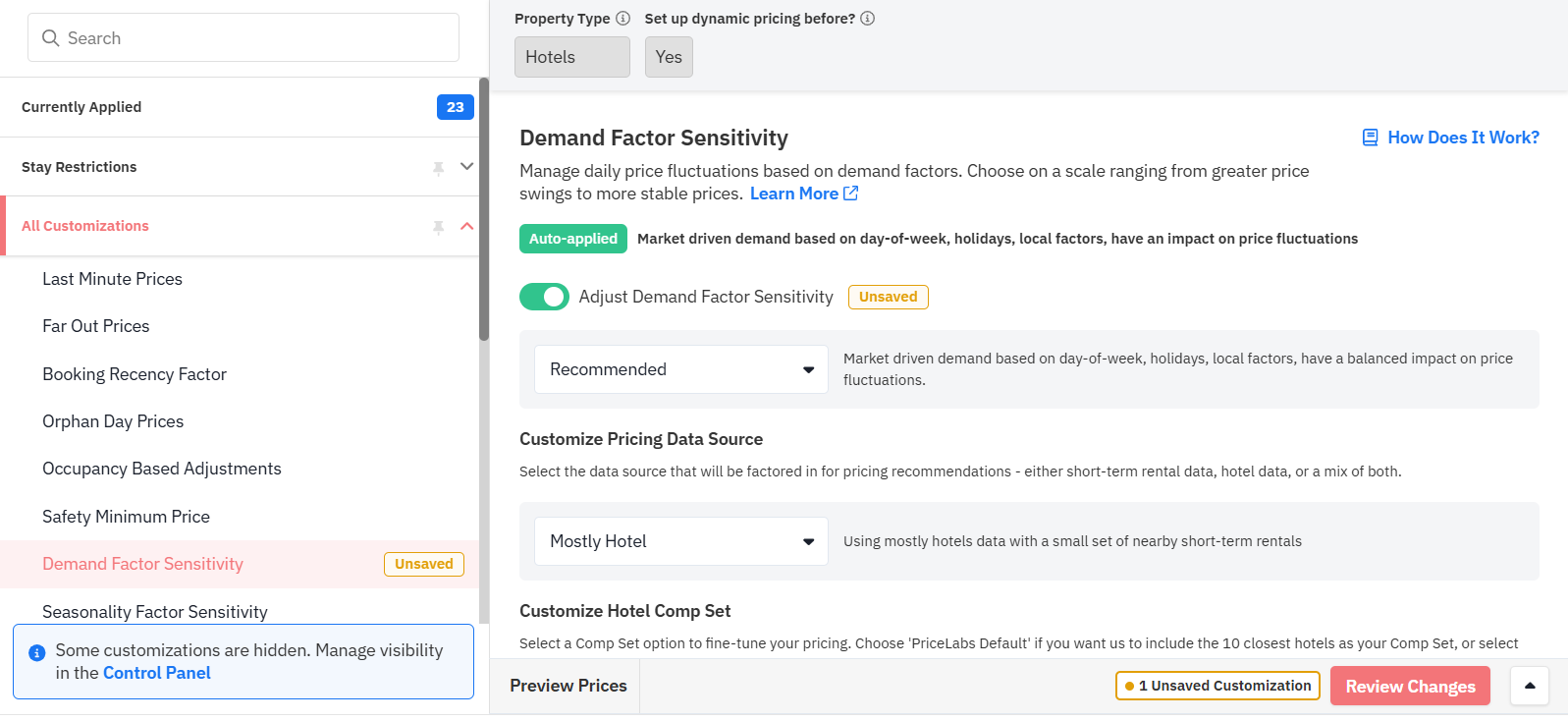
Adjusts pricing recommendations based on demand shifts such as holidays, events, and day-of-week trends.
Turn this ON and select “Recommended” to target higher rates during high-demand periods, as hotels often experience demand compression during peak periods.
Controls whether pricing recommendations are influenced by hotel data, short-term rental data, or a mix.
Enable this setting and select “Mostly Hotel” to ensure pricing is primarily driven by hotel market demand, with a small portion influenced by vacation rental trends.
Defines which competitor hotels influence pricing recommendations.
Activate this option and select “PriceLabs Default” so the system automatically considers the 10 nearest hotels when optimizing prices.
2. Seasonality
Adjusts pricing recommendations based on high and low demand periods throughout the year.
Enable this setting and choose “Conservative” to ensure smoother price adjustments without aggressive fluctuations.
Adjusts prices based on daily occupancy levels of a room type across different booking windows. This is especially important for room types with more than 5 rooms.
For hotels, turn this ON and select “Medium Booking Window” to target 50% occupancy 16–30 days before arrival.
Applies gradual discounts to room types that haven’t had recent bookings.
Toggle this ON and select “PriceLabs Recommended,” which applies a gradual 5–15% discount when bookings are slow.
How to enable these settings:
- Navigate to Customizations → Edit → All Customization.
- Locate the relevant settings, turn on the toggle, and select the recommended option
- Click Save Changes.
The settings to disable for hotels
The following settings were designed primarily for single-unit properties. Even if the toggle appears OFF, they are still active by default.
Hotels with multi-room inventory should disable these settings for better pricing performance.
How to disable these settings:
- Go to Customizations → Edit → Currently Applied
- Open each setting
- Last Minute Prices -> Turn on the toggle -> select the option ‘No last minute adjustment’
- Far-Out Premium -> Turn on the toggle -> select the option ‘No Far Out Prices’
- Orphan Day Prices -> Turn on the toggle -> select the option ‘No Orphan Day Adjustments’
- Occupancy Based Adjustments -> Turn on the toggle -> select the option ‘No Occupancy Based Adjustments’
- Click Save Changes
Note
- Apply changes gradually if needed. Preview the updated prices before saving to ensure they align with your strategy.
- Hotel accounts created after Jan 23, 2026 are already set up with these hotel-specific settings, so these setting changes are not required for them. If your account was created before this date, please follow the steps in this guide. These updates are not applied retroactively to avoid impacting your existing configurations.
Video
Reach out to support@pricelabs.co for any questions or challenges you face while implementing these settings.