How to Integrate PriceLabs with MyTourist
PriceLabs can send daily rates to MyTourist for the next 720 days, starting from the day of activation.
Feature Availability
See what features work with your PMS. Click here to check which customizations are supported for your platform, so you know what options will be available once your listings are connected.
Step 1: Connecting MyTourist to PriceLabs
- Log into PriceLabs.
- Click "Add your listings" (if you have no listings) or "Add/Reconnect Listings" (if you already have listings).
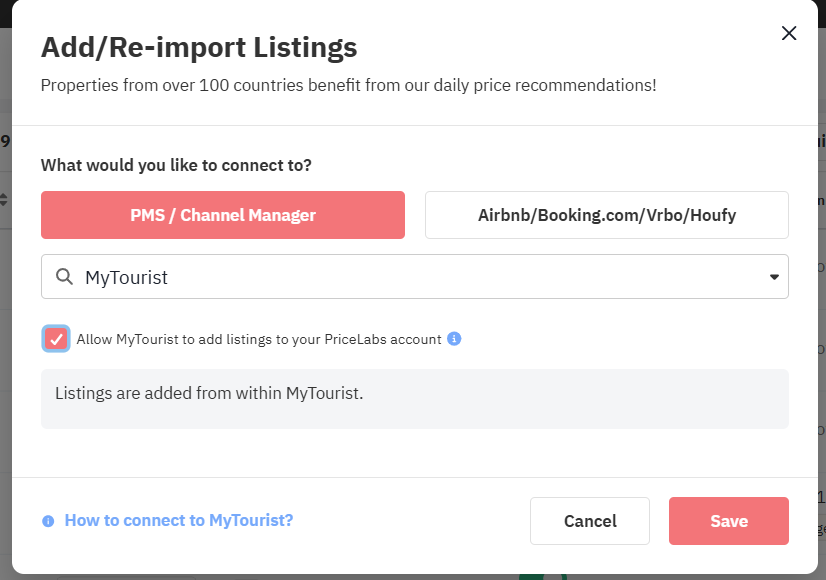
- Select "PMS / Channel Manager" and choose "MyTourist" from the dropdown.
- Tick the checkbox to "Allow MyTourist to add listings to your PriceLabs account." Then click
- Save.
Step 2: Reviewing & Syncing Prices
- Follow the Getting Started guide to set up your listings.
- Review your pricing and settings in PriceLabs.
- Enable Sync Prices for automatic updates, or click "Sync Now" to push updates immediately.
- Check your MyTourist account to verify updates
Next Steps
✅ Review pricing and rules regularly.
✅ Join our Intro to PriceLabs Live Training for further insights.
✅ Join our Intro to PriceLabs Live Training for further insights.
✅ With these steps, your PriceLabs-MyTourist integration should run smoothly!