How to opt for a Subscription Bundle
PriceLabs offers two pricing bundles, namely the Performance Bundle and the Expansion Bundle. These are aimed at offering bundled usage across products.
Performance bundle offers customer API, additional sync (or real-time sync), and 1 free Market Dashboard credit for every 20 syncing parent listings on Dynamic Pricing.
Expansion bundle offers customer API, additional sync (or real-time sync), 1 free Market Dashboard credit for every 10 syncing parent listings on Dynamic Pricing, and 1 free Revenue Estimator Pro token for every 5 syncing parent listings on Dynamic Pricing.
Everyone will start on the Dynamic Pricing Plan by default, i.e., you will have to pay for individual products and add-ons. To opt for a subscription bundle, navigate to the Subscription Page. You will see a tab within the billing page, as shown below:
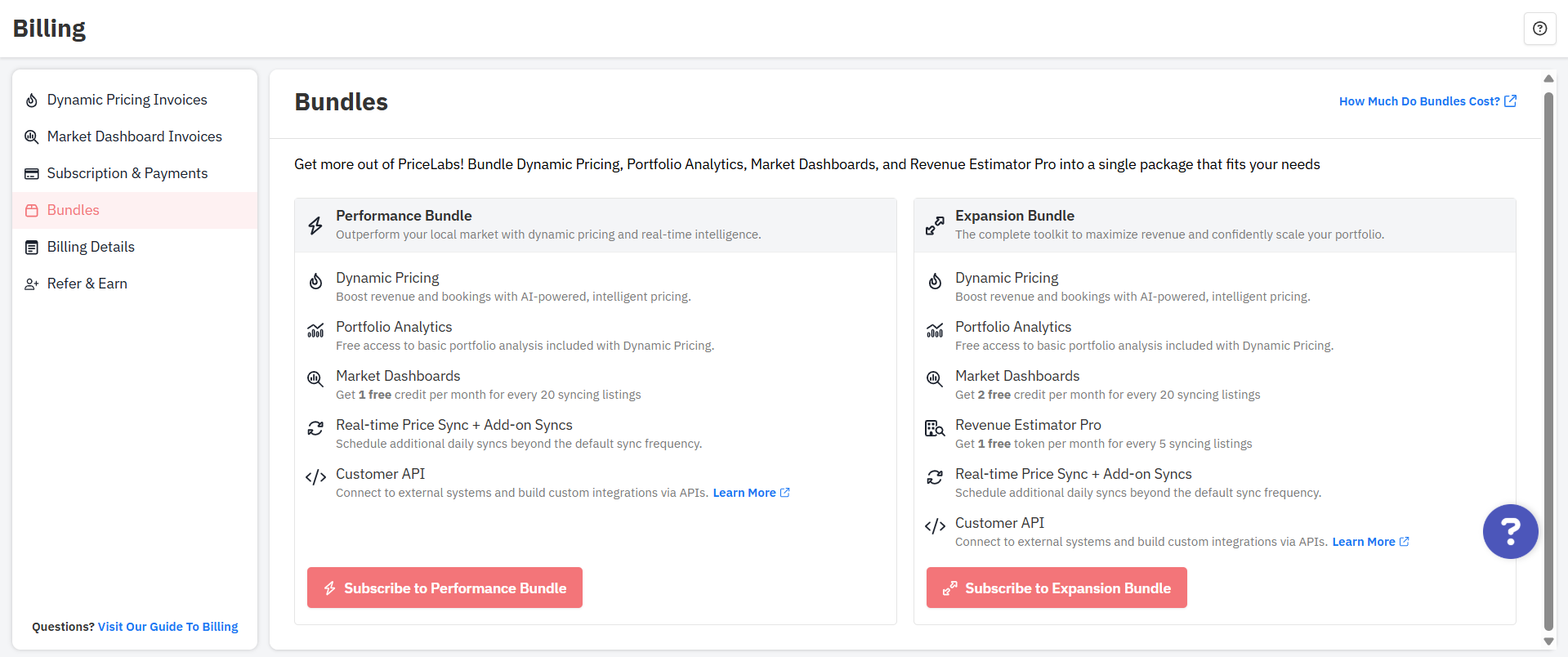
From the above tab, click on either “Subscribe to Performance Bundle” or “Subscribe to Expansion Bundle” to initiate the process to avail one of the two available subscription bundles.
Once clicked, you will see a cost comparison between current and the bundle and you can confirm to move their account to a bundle successfully.
Note: Availing a bundle for the very first time or availing the Expansion bundle from the Performance bundle will be done after confirmation. However, moving away from bundles or moving from the Expansion bundle to the Performance bundle will be effective only from the next billing cycle.