Quote Clicks Data and Search Demand Based Pricing
If you use Direct Booking Tools (DBT) with PriceLabs, you can use quote pickup data from your direct booking website to better understand booking interest and, when enabled, allow those signals to influence your pricing. For information on how to connect your Direct Booking Tools account with PriceLabs, refer to Direct Booking Tools Integration.
PriceLabs uses quote data, or the number of quotes generated for a property based on a given arrival date, to give you additional insight into demand for your properties. This data can be viewed alongside your existing pricing and market data, helping you understand how much interest your listings are receiving before a booking is made.
Viewing Quote Click Data in PriceLabs
Once your Direct Booking Tools integration is active and quote data is available for your listings, you can view it in several areas of PriceLabs:
- Listing Neighborhood Data
- Pricing Calendar
- Multi Calendar
In Listing Neighborhood Data, quote data shows you how much booking interest each property is receiving for each date. You can view these signals alongside your current rates and hyper-local market occupancy and pricing trends, giving you additional context when evaluating your pricing strategy.
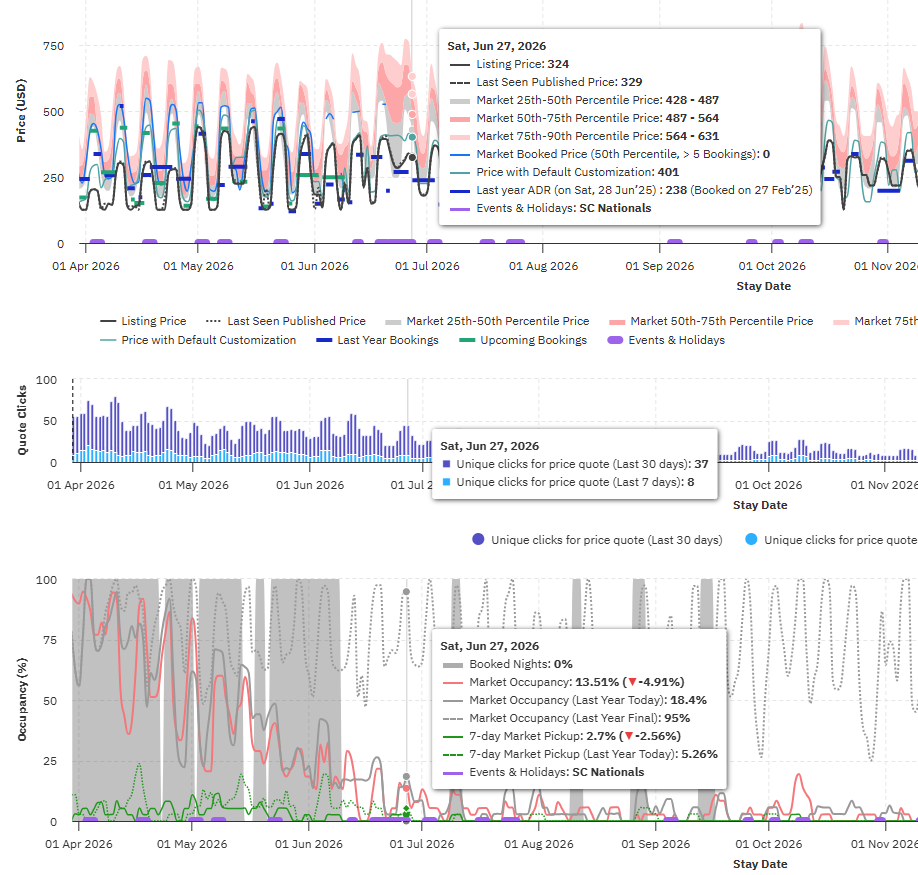
In the Pricing Calendar and Multi Calendar, you can also use calendar colors to get an at-a-glance view of quote trends. This makes it easier to identify dates or properties receiving higher or lower levels of booking interest, particularly when reviewing multiple properties in the Multi Calendar.
Using Search Demand Based Pricing
Quote data can also be used as a pricing signal through the Direct Booking Tools integration. Accounts with DBT search data integration have a toggle in the Control Panel that allows quote pickup signals from the direct booking site to automatically influence pricing.
When enabled, quote activity becomes more than an informational data point—it can be incorporated into the pricing engine to help make automated pricing adjustments based on booking interest. Head over to:
- Navigate to Customizations (Edit) → All Customizations.
- Click Search Demand Based Pricing.
- And, toggle the switch for Apply Using Search Demand Based Pricing.
This gives you a way to act on direct booking search behavior rather than simply monitoring it. For example, increased quote activity can provide an additional indication of growing interest in a property or date, while lower quote activity can provide additional context when evaluating demand.
The quote pickup pricing signal is off by default, so your pricing will not be affected unless you choose to enable it.
What Happens If the DBT Integration Becomes Inactive?
If your Direct Booking Tools integration becomes inactive after the quote pickup pricing signal has been enabled, PriceLabs will not automatically turn the setting off. Instead, an error will appear in the Customizations panel prompting you to either restore the DBT integration or manually turn off the quote pickup pricing signal.
This ensures that you remain in control of whether the pricing signal is enabled while also making it clear when the underlying data connection needs attention.